— Articles
Clash detection: finding errors before construction
When discipline models are combined, a duct may run into a beam or a pipe into a column. Clash types and the checking process.
A clash is when two elements occupy the same space or come closer than allowed. It usually happens between disciplines: a ventilation duct through a beam, a drain pipe through a column, a cable tray through a pipe. On paper such errors are found on site; in a model they are found during design.
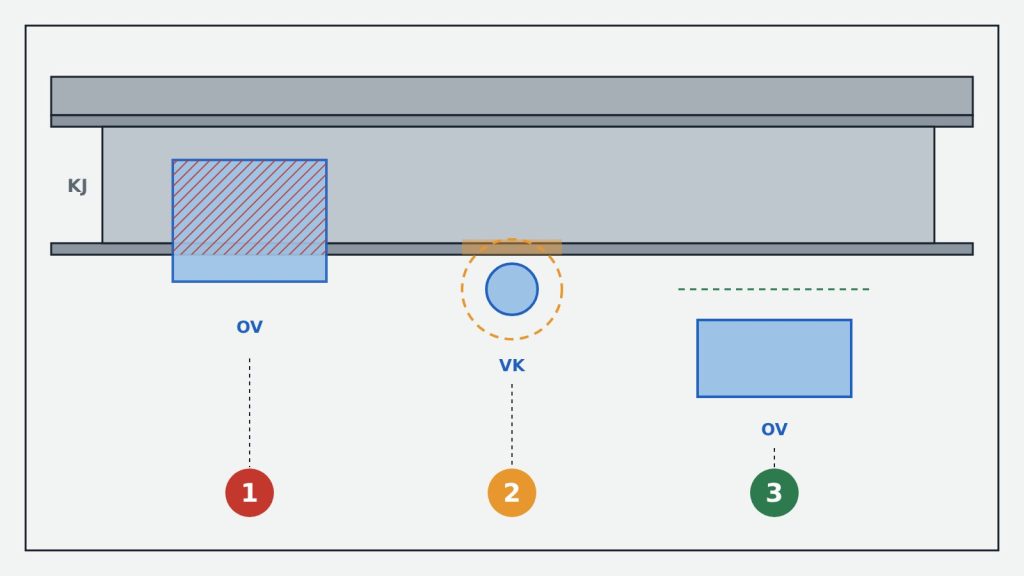
Types
- Hard — the elements actually intersect.
- Clearance — the elements do not touch but the required distance is missing, e.g. for pipe insulation or maintenance access.
- Duplicate — the same element is modelled twice.
Process
- Discipline models are combined in one coordinate system (federated model).
- Rules are set: which discipline is checked against which, and with what tolerance.
- Clashes found are grouped and a responsible discipline is assigned.
- Disciplines fix their models and the check is repeated until the clashes are closed.
One of the most widely used tools is Autodesk Navisworks. According to Autodesk, clash detection (Clash Detective) is included in Navisworks Manage, but not in Navisworks Simulate.