— Articles
LOD 100–500: how detailed should a model be
Levels of Development in the BIMForum LOD Specification: how far you can rely on a model element at each level.
During a project the model becomes more precise step by step. To agree on what can be taken from an element at each stage, teams use LOD (Level of Development). One of the most widely used references is the BIMForum LOD Specification.
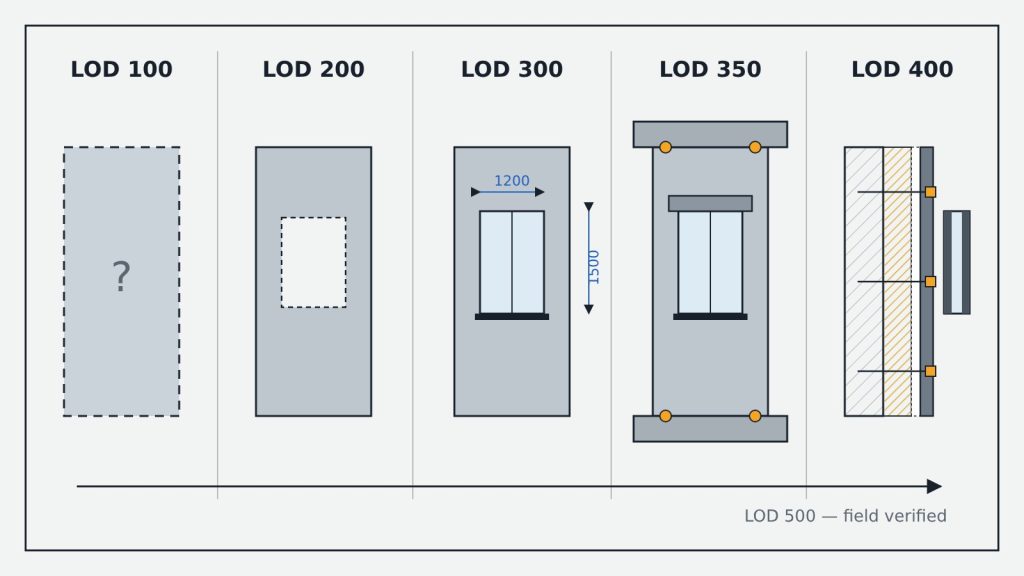
| Level | Element in the model | Used for |
|---|---|---|
| LOD 100 | A symbol or generic representation; not geometry, information is approximate | Early area and volume estimates |
| LOD 200 | A generic system, object or assembly; quantity, size, shape and location approximate | Sketch, concept |
| LOD 300 | A specific object: quantity, size, shape, location and orientation measurable from the model | Design and construction drawings |
| LOD 350 | LOD 300 plus interfaces with other building systems (supports, connections) | Cross-discipline coordination |
| LOD 400 | Detail sufficient for fabrication, assembly and installation | Fabrication, installation |
| LOD 500 | A field-verified representation | As-built model, operation |
Two important notes
- LOD is not the same as level of detail. In the specification, detail is what goes into an element, while level of development is how far the team can rely on it.
- LOD 500 is not the next step in a progression — it marks field verification, so the specification describes LOD 100–400 in detail.
In practice LOD is set per element, not for the whole model: walls may be at LOD 300 while facade cladding is at LOD 200. Record this in the BIM Execution Plan (BEP).