How many hours did the project take?
Active hours spent on each project — a real number for pricing and scheduling the next one.
BIMFab Pulse
The NORMA plugin tracks each employee’s working time inside Revit: which project, when they started, how long they worked actively, how long they were idle. The manager sees it all on one page.
Try it free for 14 days Pricing and calculator
Revit 2024–2027 · runs inside the NORMA plugin · on desktop and phone
Answers to the questions a design firm’s manager asks every day — based on real working time in Revit.
Active hours spent on each project — a real number for pricing and scheduling the next one.
A notification 3 days before a project deadline and when it passes. If urgent work comes up, pause the project and move its deadline.
Live status: who is working in Revit, who is idle, who is on a break or in a meeting — from your phone too.
What counts is active work in Revit, not time spent in the office. Employees see their own statistics.
The company admin sees all employees; an employee sees only themselves. Every section works on desktop and phone, in three languages.
Each employee card shows the current status and project: green — working, yellow — idle, red — long idle, blue — break or meeting, grey — Revit closed. Today’s active time is on every card.

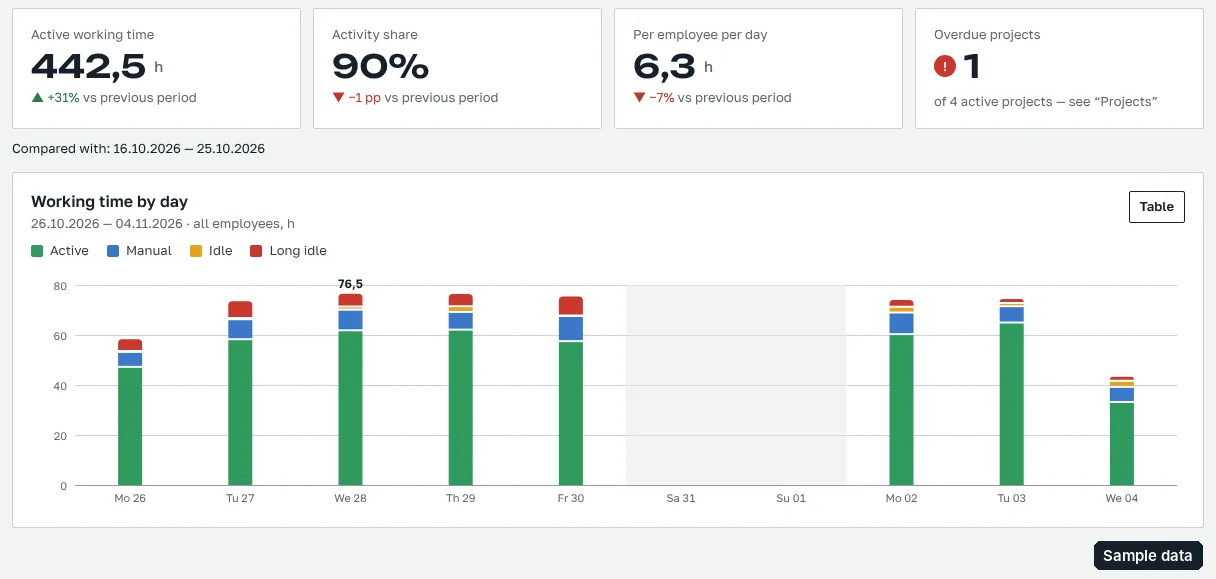
KPIs and charts for a period: active time, activity share, average per employee per day, overdue projects — compared with the previous period.

Each employee’s day on a colour strip: when they started, when they stopped, which project and which file they worked on.

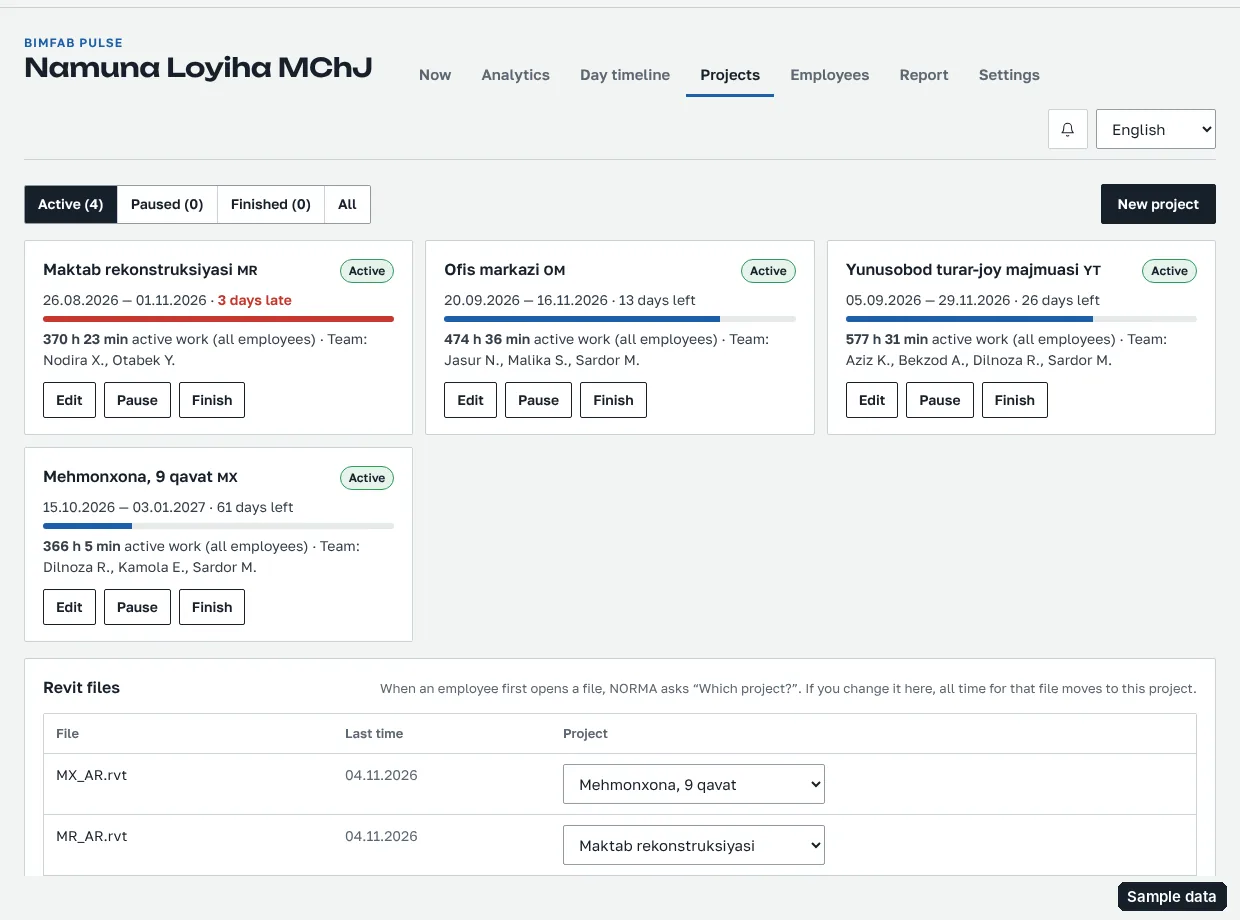
Start and end dates, team, hours spent. Urgent work — pause and move the deadline; Revit files are linked to the project.
Timesheet for the chosen period: each employee’s active hours day by day, idle and manually marked time, hours by project.

Track completed work: sheets, m², pieces — the firm defines its own work types. Employees enter it, the admin approves; next to it are the project’s active Revit time and number of model changes.
An hourly rate for each employee — the amount for the period is calculated automatically. The firm decides which statuses are paid and the coefficient for hours outside working time; manual adjustments cover work outside Revit.
About long idle time (during working hours), project deadlines, end of day and subscription — on the company admin’s page.
The admin adds, replaces or removes employees; a former employee’s data stays in the reports.
No separate app needed — bimfab.uz/pulse adapts to the phone screen in the browser.

On each employee’s computer, with their own email. The company is on a NORMA corporate subscription; Pulse is added to it.
The plugin shows what is collected; nothing is recorded until the employee confirms.
Active or idle, and which file. If the internet drops, it stores data on the computer and sends it later.
From a computer or phone. A company can have several admins.
Pulse measures work in Revit, not the person. What is and isn’t collected is spelled out.
Employees see their own statistics. Data is kept for 12 months. A BIMFAB administrator can also open the company page — for technical support.
Per month, per company — based on the number of employees. Added on top of a NORMA corporate subscription (seats).
2 000 000 UZS / month
3 500 000 UZS / month
+1 500 000 UZS / month
14-day free trial — once per company. Send a request — BIMFAB will connect your company and turn on the trial.
As of 04.11.2026, from their official pricing pages. In UZS — at the Central Bank rate (1 $ = 11 911,71 UZS). Prices change — open the source.
| Tool | What it tracks | Pricing | Per employee per month, UZS |
|---|---|---|---|
| BIMFab Pulse | Revit only: project, file, active and idle time; no screenshots | 2 000 000 UZS up to 50 employees, per month | from 40 000 (with 50 employees) |
| Hubstaff | Whole computer: time, activity, screenshots, apps and websites | 4,99–10 $ per user/month, billed annually |
≈ 59 000 – 119 000 |
| DeskTime | Whole computer: time, apps, screenshots | 6,42–9,17 $ per user/month, billed annually |
≈ 76 000 – 109 000 |
| ActivTrak | Whole computer: activity and productivity analytics | 10–21 $ per user/month, annual plans only |
≈ 119 000 – 250 000 |
| BIMbeats | Revit, AutoCAD, Rhino usage (for AEC) | 7 700 $ per year for 50 machines (third-party catalog) |
≈ 153 000 |
| Kickidler | Whole computer: time, screen, activity | 180 $ perpetual license per employee (no discount) |
≈ 2 144 000 one-time |
For a fair comparison: Hubstaff, DeskTime, ActivTrak and Kickidler track the whole computer (screenshots, websites, apps); Pulse measures only work in Revit and gives hours by project and file. The BIMbeats price comes from a third-party catalog, not the official site.
No. The employee is notified in the plugin, and nothing is recorded until they confirm. Screenshots, typed text, file paths and other apps are not collected; employees see their own statistics.
If Revit is in the foreground and less than the yellow threshold (2 minutes by default) has passed since the last action — active. Over that — yellow; over the red threshold (10 minutes by default) — red; short breaks between samples are counted too. The company admin changes the thresholds (yellow is at least 1 minute).
The employee picks a status in the plugin: break, meeting, reading drawings or on site. This time is counted separately as “manual”.
The plugin doesn’t analyse the model: it only counts time, status and number of changes, and sends a small request once a minute.
The plugin stores data on the computer and sends it when the connection is back.
Company admins see all employees; an employee sees only themselves. A BIMFAB administrator can also open it — for technical support.
Yes: the timesheet and hours by project download as a CSV file that Excel opens.
No new data is recorded; existing data is kept for 12 months and stays visible.
You send a request — BIMFAB connects your company and turns on Pulse free for 14 days. The trial is given once per company. Employees must be registered in the NORMA plugin with their own email.
Revit 2024, 2025, 2026 and 2027 — on Windows, through the NORMA plugin.
Send a request with the number of employees and their emails. BIMFAB will connect your company, turn on Pulse and assign an admin.
We accept
UzcardHumoVisaMastercard
Payment takes place on the payment system’s protected page and is confirmed with 3D Secure. Card details are not stored on our site.